Last week I blogged about how to create a RESTful service using WCF and how it was to actually not learn anything in order to make your existing WCF service RESTful.
Converting a normal WCF service to being RESTful might be an easy task, but when it comes to streaming files over a REST call using WCF, it might get a little tricky.
Here we are going to cover just that part of our service. This article is in continuation of the last one. So, I would advice you to go through it to get some context.
So, to start of with the implementation, we’ll write the service contract code first as shown below :
[ServiceContract]
   public interface IFileUploadServ
   {
       [OperationContract]
       [WebGet(UriTemplate = "File/{fileName}/{fileExtension}")]
       Stream DownloadFile(string fileName, string fileExtension);

       [OperationContract]
       [WebInvoke(Method = "POST", UriTemplate = "/UploadFile?fileName={fileName}")]
       void UploadCustomFile(string fileName, Stream stream);
   }
public class FileUploadServ : IFileUploadServ
{
    public Stream DownloadFile(string fileName, string fileExtension)
    {
        string downloadFilePath = Path.Combine(HostingEnvironment.MapPath("~/FileServer/Extracts"), fileName + "." + fileExtension);

        //Write logic to create the file
        File.Create(downloadFilePath);

        String headerInfo = "attachment; filename=" + fileName + "." + fileExtension;
        WebOperationContext.Current.OutgoingResponse.Headers["Content-Disposition"] = headerInfo;

        WebOperationContext.Current.OutgoingResponse.ContentType = "application/octet-stream";

        return File.OpenRead(downloadFilePath);
    }

    public void UploadFile(string fileName, Stream stream)
    {
        string FilePath = Path.Combine(HostingEnvironment.MapPath("~/FileServer/Uploads"), fileName);

        int length = 0;
        using (FileStream writer = new FileStream(FilePath, FileMode.Create))
        {
            int readCount;
            var buffer = new byte[8192];
            while ((readCount = stream.Read(buffer, 0, buffer.Length)) != 0)
            {
                writer.Write(buffer, 0, readCount);
                length += readCount;
            }
        }
    }
A few things to note from the above piece of code :
- For File download scenarios, we need are using the WebGet attribute, indicating that it is indeed a get Call for a file on the server.
- Also, in file download, we need to add some header info like Content-disposition and Content-Type to the outgoing response in order for the consuming client to understand the file.
- For File upload scenarios, we are using WebInvoke with POST method
- We need to make sure that the location in which we are writing the file to (“FilServer/Uploads”), is write enabled for the IIS app pool process.
Apart from the above piece of code, the web.config entries need to be as below (we need to specify reader quotas and message sizes in order to allow for larger files to stream over):
<system.serviceModel>
    <bindings>
      <webHttpBinding>
        <binding name="MyWcfRestService.WebHttp" maxBufferSize="2147483647"
                 maxBufferPoolSize="2147483647"
                 maxReceivedMessageSize="2147483647"
                 transferMode="Streamed"
                 sendTimeout="00:05:00">
          <readerQuotas  maxDepth="2147483647"
                         maxStringContentLength="2147483647"
                         maxArrayLength="2147483647"
                         maxBytesPerRead="2147483647"
                         maxNameTableCharCount="2147483647"/>
          <security mode="None" />
        </binding>
      </webHttpBinding>
    </bindings>
    <services>
        <service behaviorConfiguration="MyWcfRestService.FileUploadServBehavior" name="MyWcfRestService.FileUploadServ">
        <endpoint address="" behaviorConfiguration="web" binding="webHttpBinding" bindingConfiguration="MyWcfRestService.WebHttp" contract="MyWcfRestService.IFileUploadServ">
          <identity>
            <dns value="localhost" />
          </identity>
        </endpoint>
        <endpoint address="mex" binding="mexHttpBinding" contract="IMetadataExchange" />
      </service>
    </services>
    <behaviors>
      <endpointBehaviors>
        <behavior name="web">
          <webHttp />
        </behavior>
      </endpointBehaviors>
      <serviceBehaviors>
        <behavior name="MyWcfRestService.FileUploadServBehavior">
          <serviceMetadata httpGetEnabled="true" />
          <serviceDebug includeExceptionDetailInFaults="true" />
        </behavior>
      </serviceBehaviors>
    </behaviors>
  </system.serviceModel>
Now, there is one small problem (gotcha), when we try to write the same code in .NET 3.5
The problem happens when we try to debug our WCF code (i.e. press F5) and open up the FileUploadServ.svc URL in our browser. We are greeted with the below page :
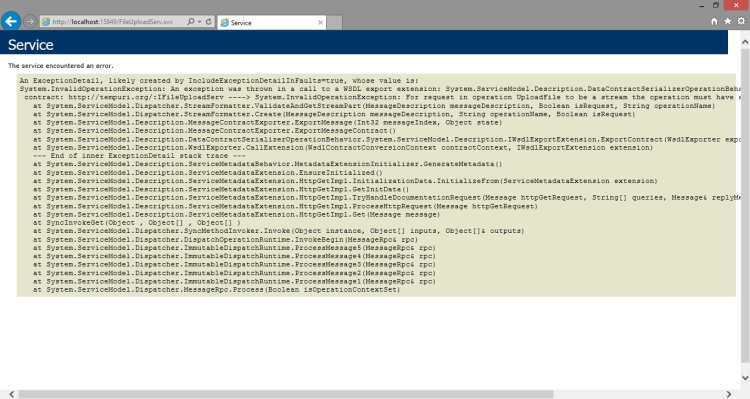
The error on the page says :
For request in operation UploadFile to be a stream the operation must have a single parameter whose type is Stream.
The above message occurs only when we create the service in .NET 3.5. For .NET 4.0 its not a problem.
The good news is that its just a Red-herring and could be thought of as false warning. This I say because if we hit our service from a consuming client, it would run just fine. Its just that when we activate our service, it does not work.
The bottom line is that we can easily ignore this error.
Now, onto writing the JavaScript code to consume the service. Its pretty straightforward if you ask me.
 <div>
            <input type="file" id="fileUpload" value="" />
            <br />
            <br />
            <button id="btnUpload" onclick="UploadFile()">
                Upload</button>
        </div>
        <button id="btnDownload" onclick="DownloadFile()">
            Download</button>
function UploadFile() {
            // grab your file object from a file input

            fileData = document.getElementById("fileUpload").files[0];
            var data = new FormData();

            $.ajax({
                url: 'http://localhost:15849/FileUploadServ.svc/UploadFile?fileName=' + fileData.name,
                type: 'POST',
                data: fileData,
                cache: false,
                dataType: 'json',
                processData: false, // Don't process the files
                contentType: "application/octet-stream", // Set content type to false as jQuery will tell the server its a query string request
                success: function (data) {
                    alert('successful..');
                },
                error: function (data) {
                    alert('Some error Occurred!');
                }
            });

        }

        function DownloadFile() {

            window.location("http://localhost:15849/FileUploadServ.svc/File/Custom/xls");

        }
That’s it. You’re Done. We have successfully implemented a WCF RESTful File Upload/Download service in .NET 3.5 (and higher)
Also, I’ve attached by complete project demonstrating WCF RESTful service here.
Please do provide your valuable feedback in the comments below and let me know if you face any issues while implementing the service/.
 Chinmoy Mohanty's Blog
This is the best guide for uploading and downloading files by RESTFULL webservices on the internet!
Thanks
LikeLike
Thank you Snike.
Glad to know that it was helpful.
LikeLike
I have implemented the code above for FileUploads only. Couple of things
My .ajax call consistently returns error almost immediately after it starts.
The upload is inconsistent. On occasion I see error “HTTP/1.1 408 Request body incomplete” in Fiddler, which other times it will upload the file successfully (ajax still reports error). I have been testing with the same 150K image file.
LikeLike
Hi Dmitriy
You can find the latest source code with example upload page here. Hope it helps.
LikeLike
HI Chinmoy,
I was able to resolve my issue by adding “async: false,” to the .ajax call. Once that was done all issues I listed above were fixed. Let me know if there is a better option.
Thanks,
Dmitriy
LikeLike
Ah well.. Good to know.
LikeLike
Hi there! Your example is very useful, thank you, but I have to tweak it a little.
For the download part, I need to send authentication headers to the server along with the request
$.ajax({
type: “POST”,
contentType: ‘application/json; charset=utf-8’,
headers: { ‘AK’: myHash },
url: myDownloadURL,
data: JSON.stringify({ … }),
processData: false
});
This call is working but I don’t know how to prompt the user with the save dialog box
thank you
LikeLike
Apologies for being late at replying..
Did you happen to get the solution for the above?
IMO, you’ll need a method with a return type of FileResult in C#; This method will inspect teh auth headers and then send over a file if auth succeeds. This is the “url” you need to specify in your jQuery call.
LikeLike
Thanks Chinmoy ..such a great post
LikeLike
Thank you very much for your post, it is a great guide. I was wondering how would you report progress?
LikeLike
at server part this code line gives error
“while ((readCount = stream.Read(buffer, 0, buffer.Length)”
stream is null exception ? how can i solve this
LikeLike
Thanks very much…
LikeLike
Hi there! Your example is very useful, thank you.
In my case it displays successful alert thought,file is not uploaded..
LikeLike
it doesnt work, please help, I hava try in many differents ways, when is running the wcf code doesnt enter into the bucle while, its like the stream is empty
LikeLike